Showing posts with label SAS. Show all posts

Nov 2, 2015

Tableau 9.1.1 can now read SAS datasets

Hey Folks,

I guessed this was coming...I just noticed that Tableau 9.1.1 can now read SAS datasets...Even Tableau Public has that option...

The "Statistical File" option in the "Connect" menu allows to load the SAS dataset....

I'm sure SAS won't be happy in one way considering SAS VA adoptability....But the positive side of it is that more clients will learn and adopt dashboard visualizations i.e. expand the BI dashboard providers market...

Screenshot from Tableau Public below...


Aug 31, 2015


Hey All,

Today I happened to read this good presentation about the Data Visualization Best Practices in Business Intelligence reports...

There is a excellent graphic referenced here which summarizes which type of data visualization Graphic would be better for a particular data analysis...


Jun 8, 2015

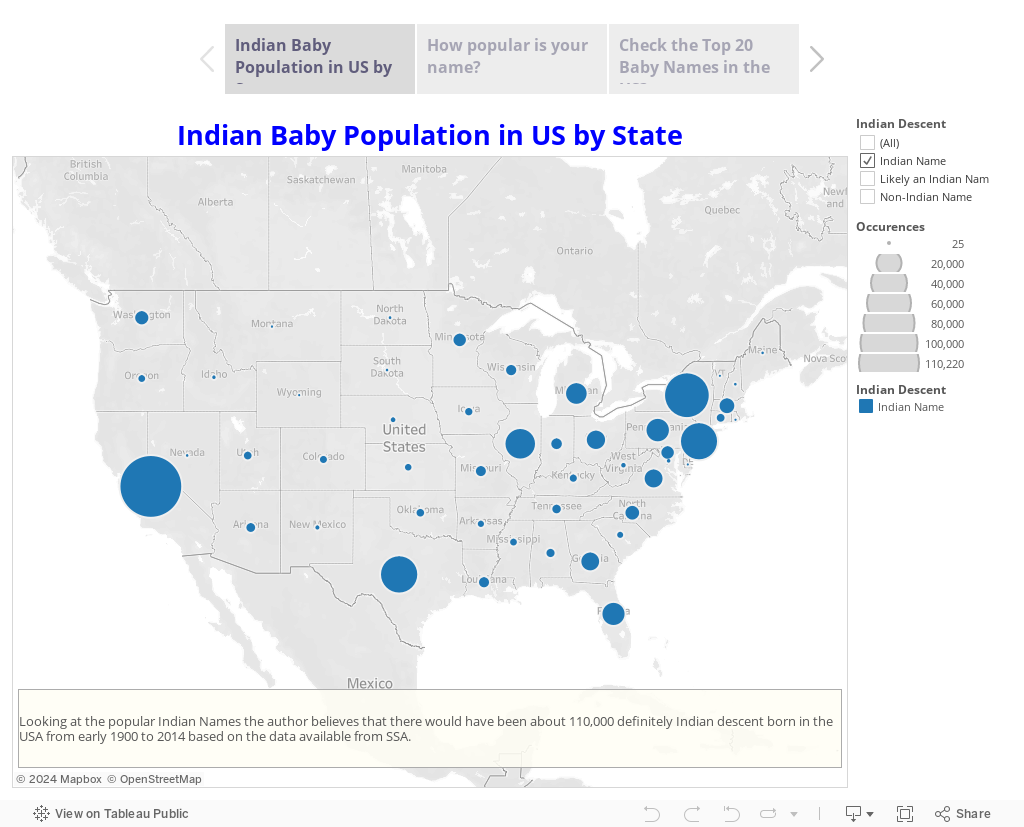
Indian Baby Population in US by State


Folks, I was going thru few visualizations on Tableau's website today and I came across this visualization Exploring the SSA Baby Names Dataset by one of the acclaimed Tableau professional....It made me thinking to explore of How many of those SSA baby names are of Indian American (Desi) descent...

I found a website online that had a list of popular Indian baby names...I read the data into SAS and made a Tableau Story out of it... Please take a few moments to play with this interesting viz...I hope you like it....


Here's the SAS code that went into the prep of the data...


/*Read Indian Baby Names by parsing the http URL */

libname sharad "C:\Users\Sharad\Desktop\namesbystate";

%macro loop(type);

proc sql; drop table name; quit;
%do i=1 %to 60;
filename foo url
    "http://www.modernindianbabynames.com/modern_baby_name/starting_with/ANY/MF/Sikh/1560/&i.";
      
data _null;
retain start recind recst recend hier;
length SN Name Meaning Gender Origin $ 100;
retain SN Name Meaning Gender Origin;
   infile foo length=len;
   input record $varying200. len;
   put record $varying200. len;
   if index(record,') then start=1;
   if index(record,'
') then start=0;
   if index(record,') then delete;
   if index(record,'
'
) then do; recvalst=1; hier+1;; end;
   if index(record,'
') then do; recvalend=1; delete; end;
   if index(record,' ' ) then do; recst=1; hier=0;delete; end;
   if index(record,'
') then do; recst=0; hier=0;; end;
  
      if hier=1 then do; record=tranwrd(record,'
'
,''); SN=strip(record); end;
      else if hier=2 then do; record=tranwrd(record,'
'
,''); Name=strip(record); end;
      else if hier=3 then do; record=tranwrd(record,'
'
,''); Meaning=strip(record); end;
      else if hier=4 then do; record=tranwrd(record,'
'
,''); Gender=strip(record); end;
      else if hier=5 then do; record=tranwrd(record,'
'
,''); Origin=strip(record); end;
      record=tranwrd(record,'
'
,'');
      record=tranwrd(record,'
','');
      record=strip(record);
   if index(record,'
') and start then do; recend=1; hier=0; output; end;
   else delete;  
   keep SN Name Meaning Gender Origin;
run;

OPTION SPOOL;
proc append data=_null base=sharad.&type force; run;

%end;


%mend loop;

%loop(Hindi);

/*
Make a list of Indian Names that definetly sound Indian or Closely Indian
Y - Yes
P - Indian Possibility
*/

data Sharad.Def_IndiaNames;
infile cards4 dlm='09'x missover;
length Name $ 100 IndianorNot $ 1;
input Name IndianorNot;
Name=strip(propcase(Name));
cards;
Name  Indian
Tina  P
Tanya P
Maya  P
Trisha      Y
Nadia P
Amir  P
Aisha P
Tanisha     P
Chandra     P
Chaya P
Rohan Y
----and 1000’s of other records---
;
run;

/*
Join all available Indian Names
*/
data Sharad.ALLNames;
set Sharad.telugu
 sharad.bengali sharad.hindi sharad.sikh;
 Name=translate(Name,'',"'");
 if compress(Name)='' then delete;
 drop SNO SN;
run;

/*
Remove Dups
*/
proc sort data=Sharad.ALLNames noduprecsby Name; run;

/*
Re-purpose the data a bit
*/
data Sharad.IndianNames(rename=(dMeaning=Meaning dGender=IGender dOrigin=Origin));
length dMeaning $ 100 dGender $15 dOrigin $ 100;
retain dMeaning dGender dOrigin;
set Sharad.ALLNames;
by Name;
if  first.name then
do;
dMeaning='';
dOrigin='';
dGender='';
end;
if index(strip(dMeaning),strip(Meaning)) eq 0 then  dMeaning=catx(' OR ',strip(dMeaning),strip(Meaning));
if index(strip(dOrigin),strip(Origin)) eq 0 then  dOrigin=catx(' ,',strip(dOrigin),strip(Origin));;
if index(strip(dGender),strip(Gender)) eq 0 then  dGender=catx(' OR ',strip(dGender),strip(Gender));;
if dGender in ("Boy OR Girl","Girl OR Boy") then dGender="Boy OR Girl";
dGender=strip(dGender);
if  last.name then output;
keep Name dMeaning dGender dOrigin;
run;

/*
Read US Gov SSA Baby Names data fields
*/
filename allst "C:\Users\Sharad\Desktop\namesbystate\all\allstates.txt";

data Sharad.USNames;
infile allst dlm=',' dsd missover firstobs=2;
length State $ 2 Gender $1 Year $4 Name $ 50 ;
input State Gender Year Name Occurences;
run;

/*
Merge US Gov SSA Baby Names data with Indian Names Data
*/
proc sql;
create table sharad.IndNames as
select A.*,IGender,Meaning,Origin
from Sharad.USNames A
left join Sharad.IndianNames B
on A.name=B.name
order by A.name;
quit;

/*
Merge US Gov SSA Baby Names data with Hand picked Indian Data
*/

proc sql;
create table sharad.DefinitelyIndian as
select A.*,
case
when A.name=B.name and IndianorNot='Y' then 'Indian Name'
when A.name=B.name and IndianorNot='P' then 'Likely an Indian Name'
else 'Non-Indian Name'
end as IndianDescent length=10
from sharad.IndNames A
left join Sharad.Def_IndiaNames B
on A.name=B.name
;

quit;

Jan 11, 2013

View SAS datasets / code without installing SAS on your system with SAS Universal Viewer Application

The SAS Universal Viewer (Download here) is a replacement for the SAS System Viewer and is an application for the Windows environment to view SAS data sets and other simple text-based files. You cannot edit SAS data sets with the SAS Universal Viewer, but you can sort and filter data sets. The SAS Universal Viewer enables you to view the contents of SAS data sets without invoking SAS and without installing SAS on your machine.
With the SAS Universal Viewer you can view the following files:
  • SAS data sets
  • SAS v9 transport files
  • text files, including .sas, .txt. log, and so on
  • .html and other file types that open in Internet Explorer
  • SAS data sets that were created on platforms other than Windows
And also You can rearrange your view of the data in the following ways:
  • sort your view of a SAS data set by column
  • subset the data by using a WHERE clause
  • resize columns
  • copy data elements to the clipboard
  • find text in a SAS data set by using expressions to filter rows and columns
It’s nice tool to have If you want to introduce someone to the SAS Software and/or view the dataset / files without invoking SAS….
After downloading please double-click on setup.exe and install…It would install 3 items – Java JRE, SAS OLEDB provider and SAS Universal viewer in couple of minutes…
Screen Shot of a dataset opened with SAS Universal viewer
Screen Shot of a SAS Program opened with SAS Universal viewer
sas dataset
Read more below


Jan 19, 2012

SAS Errors, Notes and Warnings

My take on general errors that a SAS developer need to watch out for...

Problem Symptom
missing RUN statement "PROC (or DATA) step running" at top of active window
missing semicolon log message indicating an error in a statement that seems to be valid
unbalanced quotation marks log message indicating that a quoted string has become too long or that a statement is ambiguous
invalid option log message indicating that an option is invalid or not recognized
Missing = after data= option on any proc step Gives an error in the log
*text; This commenting style creates problems within %macro and %mend
Commenting Style in Mainframe Avoid placing the /* comment symbols in columns 1 and 2. On Mainframe operating systems, SAS might interpret a /* in columns 1 and 2 as a request to end the SAS job or session. 
Formats length is small If a format is too small, the following message is written to the SAS log: "NOTE: At least one W.D format was too small for the number to be printed. The decimal may be shifted by the 'BEST' format."
Print Procedure Forgetting Label option on Proc Print
SQL/ Dataset Quit statement for Proc SQL
quotes in titles statement " Joan's Report"
merge statement No sort before merge
SQL/ Dataset alias in SQL
Tabulate / Means Class and Var statements  (char and Var statement)
  Invalid data type for data type numeric
  Inappropriate dataset and system options
  problems in Resolving Macros
  Append problems force option …datatype and lengths should be similar
  Automatic Num-Char or Char-Num conversion
  Proc format value statement errors char and numeric
  incorrect lengths - length statement type- logic errors
  Input statement /positions / informats/ missover / dsd/ dlm
putting a space after in the SAS Date constants data some; TestDate='01jan2000' d; run;
   
SQL Column Not available on the Table
  Datatype Mismatch in the Where Clause
  Use Feedback option when required to look at the SQL sent to the DBMS
   
   
Macro When the macro processor cannot resolve a macro variable reference, a message is printed in the SAS log. For example, referencing a nonexistent macro variable results in a warning message. 
  Referencing an invalid macro variable name results in an error message
To find… Do this for Resolution…
Undefined or misspelled keywords In the Appearance tab of the Enhanced Editor Options dialog box, set the file elements Defined keyword, User defined keyword, and the Undefined keyword to unique color combinations. When SAS recognizes a keyword, the keyword changes to the defined colors. You'll be able to easily spot undefined keywords by looking for the colors that you selected for undefined keywords.
Unmatched quoted strings Look for one or more lines of the program that are the same color. Text following a quotation mark remains the same color until the string is closed with a matching quotation mark.
Unmatched comments Look for one or more lines of the program that are the same color. Text that follows an open comment symbol ( /* ) remains the same color until the comment is closed with a closing comment symbol ( */).
Matching DO-END pairs Place the cursor within a DO-END block and press Alt+[. The cursor moves first to the DO keyword. If one of the keywords is not found, the cursor remains as positioned. When both of the keywords exist, pressing Alt+[ moves the cursor between the DO-END keywords.
Matching parentheses or brackets Place the cursor on either side of the parenthesis or bracket. Press Ctrl+]. The cursor moves to the matching parentheses or bracket. If one is not found, the cursor remains as positioned.
Missing semi-colons ( ; ) Look for keywords that appear in normal text.

Other Interesting Articles

The top 10 SAS Errors, Notes and Warnings that SAS Tech Support gets Calls for