Showing posts with label Base SAS. Show all posts

Nov 2, 2015

Tableau 9.1.1 can now read SAS datasets

Hey Folks,

I guessed this was coming...I just noticed that Tableau 9.1.1 can now read SAS datasets...Even Tableau Public has that option...

The "Statistical File" option in the "Connect" menu allows to load the SAS dataset....

I'm sure SAS won't be happy in one way considering SAS VA adoptability....But the positive side of it is that more clients will learn and adopt dashboard visualizations i.e. expand the BI dashboard providers market...

Screenshot from Tableau Public below...


Jun 8, 2015

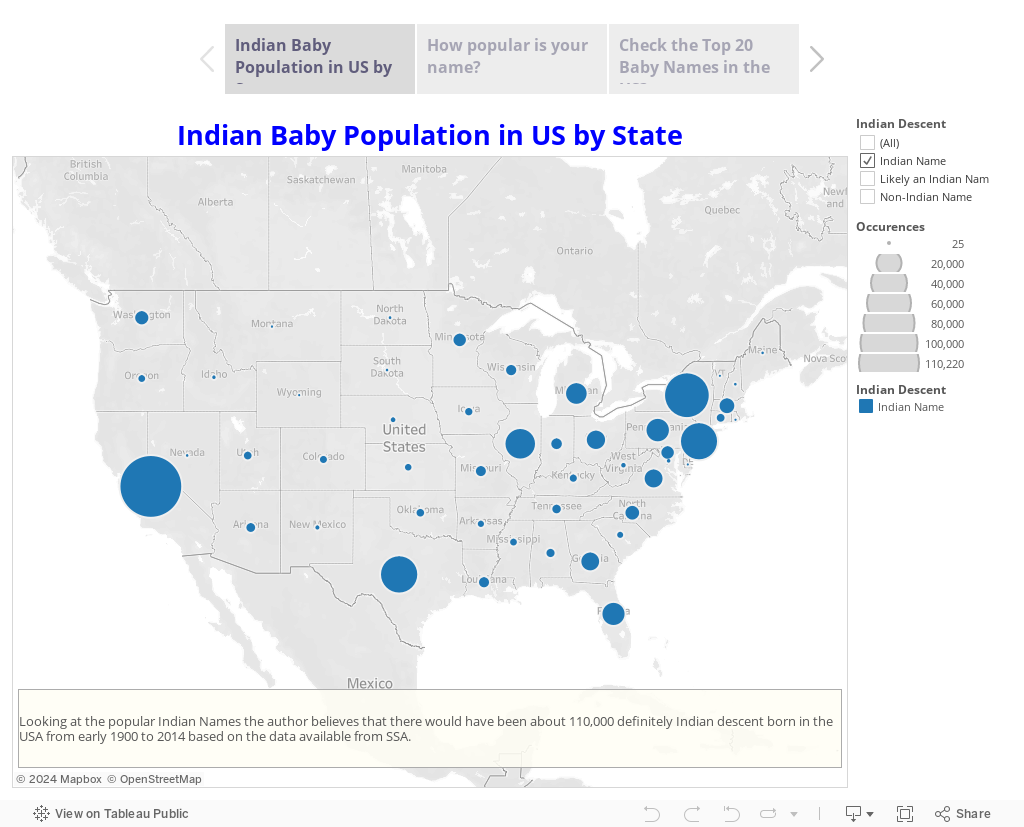
Indian Baby Population in US by State


Folks, I was going thru few visualizations on Tableau's website today and I came across this visualization Exploring the SSA Baby Names Dataset by one of the acclaimed Tableau professional....It made me thinking to explore of How many of those SSA baby names are of Indian American (Desi) descent...

I found a website online that had a list of popular Indian baby names...I read the data into SAS and made a Tableau Story out of it... Please take a few moments to play with this interesting viz...I hope you like it....


Here's the SAS code that went into the prep of the data...


/*Read Indian Baby Names by parsing the http URL */

libname sharad "C:\Users\Sharad\Desktop\namesbystate";

%macro loop(type);

proc sql; drop table name; quit;
%do i=1 %to 60;
filename foo url
    "http://www.modernindianbabynames.com/modern_baby_name/starting_with/ANY/MF/Sikh/1560/&i.";
      
data _null;
retain start recind recst recend hier;
length SN Name Meaning Gender Origin $ 100;
retain SN Name Meaning Gender Origin;
   infile foo length=len;
   input record $varying200. len;
   put record $varying200. len;
   if index(record,') then start=1;
   if index(record,'
') then start=0;
   if index(record,') then delete;
   if index(record,'
'
) then do; recvalst=1; hier+1;; end;
   if index(record,'
') then do; recvalend=1; delete; end;
   if index(record,' ' ) then do; recst=1; hier=0;delete; end;
   if index(record,'
') then do; recst=0; hier=0;; end;
  
      if hier=1 then do; record=tranwrd(record,'
'
,''); SN=strip(record); end;
      else if hier=2 then do; record=tranwrd(record,'
'
,''); Name=strip(record); end;
      else if hier=3 then do; record=tranwrd(record,'
'
,''); Meaning=strip(record); end;
      else if hier=4 then do; record=tranwrd(record,'
'
,''); Gender=strip(record); end;
      else if hier=5 then do; record=tranwrd(record,'
'
,''); Origin=strip(record); end;
      record=tranwrd(record,'
'
,'');
      record=tranwrd(record,'
','');
      record=strip(record);
   if index(record,'
') and start then do; recend=1; hier=0; output; end;
   else delete;  
   keep SN Name Meaning Gender Origin;
run;

OPTION SPOOL;
proc append data=_null base=sharad.&type force; run;

%end;


%mend loop;

%loop(Hindi);

/*
Make a list of Indian Names that definetly sound Indian or Closely Indian
Y - Yes
P - Indian Possibility
*/

data Sharad.Def_IndiaNames;
infile cards4 dlm='09'x missover;
length Name $ 100 IndianorNot $ 1;
input Name IndianorNot;
Name=strip(propcase(Name));
cards;
Name  Indian
Tina  P
Tanya P
Maya  P
Trisha      Y
Nadia P
Amir  P
Aisha P
Tanisha     P
Chandra     P
Chaya P
Rohan Y
----and 1000’s of other records---
;
run;

/*
Join all available Indian Names
*/
data Sharad.ALLNames;
set Sharad.telugu
 sharad.bengali sharad.hindi sharad.sikh;
 Name=translate(Name,'',"'");
 if compress(Name)='' then delete;
 drop SNO SN;
run;

/*
Remove Dups
*/
proc sort data=Sharad.ALLNames noduprecsby Name; run;

/*
Re-purpose the data a bit
*/
data Sharad.IndianNames(rename=(dMeaning=Meaning dGender=IGender dOrigin=Origin));
length dMeaning $ 100 dGender $15 dOrigin $ 100;
retain dMeaning dGender dOrigin;
set Sharad.ALLNames;
by Name;
if  first.name then
do;
dMeaning='';
dOrigin='';
dGender='';
end;
if index(strip(dMeaning),strip(Meaning)) eq 0 then  dMeaning=catx(' OR ',strip(dMeaning),strip(Meaning));
if index(strip(dOrigin),strip(Origin)) eq 0 then  dOrigin=catx(' ,',strip(dOrigin),strip(Origin));;
if index(strip(dGender),strip(Gender)) eq 0 then  dGender=catx(' OR ',strip(dGender),strip(Gender));;
if dGender in ("Boy OR Girl","Girl OR Boy") then dGender="Boy OR Girl";
dGender=strip(dGender);
if  last.name then output;
keep Name dMeaning dGender dOrigin;
run;

/*
Read US Gov SSA Baby Names data fields
*/
filename allst "C:\Users\Sharad\Desktop\namesbystate\all\allstates.txt";

data Sharad.USNames;
infile allst dlm=',' dsd missover firstobs=2;
length State $ 2 Gender $1 Year $4 Name $ 50 ;
input State Gender Year Name Occurences;
run;

/*
Merge US Gov SSA Baby Names data with Indian Names Data
*/
proc sql;
create table sharad.IndNames as
select A.*,IGender,Meaning,Origin
from Sharad.USNames A
left join Sharad.IndianNames B
on A.name=B.name
order by A.name;
quit;

/*
Merge US Gov SSA Baby Names data with Hand picked Indian Data
*/

proc sql;
create table sharad.DefinitelyIndian as
select A.*,
case
when A.name=B.name and IndianorNot='Y' then 'Indian Name'
when A.name=B.name and IndianorNot='P' then 'Likely an Indian Name'
else 'Non-Indian Name'
end as IndianDescent length=10
from sharad.IndNames A
left join Sharad.Def_IndiaNames B
on A.name=B.name
;

quit;

Jul 7, 2014

Put distinct values of a variable in a SAS dataset to a macro variable

As a SAS programmer, one would encounter many instances where one is required to create a comma or a pipe delimited list of dataset values from a dimension dataset and use that list to pull in records from a detailed transactions dataset…Usually that list is used in a SQL query or a Datastep’s IN clause. For eg. Get a subset list of car models of interest and query another fact transactions table to get all the cars sold for that model by month.
This macro below can easily build that for those kind of instances.

/**************************************************************************************************************
* Macro_Name:   put_distinct_varvalues_in_list                                                                       
*
* Purpose: Macro to put distinct dataset variable values as a quoted list in a macro variable
*         
*                                                                                                             
* Usage: %put_distinct_varvalues_in_list;
*
* Input_parameters: dsn - Name of the dataset
*                   var - Variable in the dataset whose distinct values are required in list format
*                   mac_var - Name of the macro variable to store the list
*                   dlm - delimiter in the list...comma is the default
*                   quotes - what type of quoting is reqd...double quote is the default
*                                                                                                             
* Outputs:  None.                                                                                              
*                                                                                                             
* Returns:  None  
*
* Example:
*                                                                                                             
* Modules_called: None
*
* Maintenance_History:                                                                                       
*-------------------------------------------------------------------------------------------------------------*
*  Date:      |   Who:        |  Description:                                                                 *
*-------------------------------------------------------------------------------------------------------------*
* 10/14/2014  | Sharad           | Initial creation.                                                          *
*-------------------------------------------------------------------------------------------------------------*
* HeaderEnd:                                                                                                  *
**************************************************************************************************************/

%macro put_distinct_varvalues_in_list(dsn,var,mac_var,dlm=comma,quotes=double);

     %global &mac_var.;
     %if %upcase(&dlm) eq COMMA %then %let dlm=%str(,);
     %else %if %upcase(&dlm) eq PIPE %then %let dlm=%str(|);
       %else %if %upcase(&dlm) eq SPACE %then %let dlm=%str( );

     proc sql noprint;
     select DISTINCT
     %if %upcase(&quotes) eq SINGLE %then %do; "'"||&var.||"'" %end;
     %else %if %upcase(&quotes) eq DOUBLE %then %do; quote(&var.) %end;
       %else %if %upcase(&quotes) eq NONE %then %do; (&var.) %end;
     %else &var.;
     into :&mac_var separated by "&dlm."
     from &dsn;
     quit;


     %let &mac_var = &&&mac_var;
     %put &mac_var = &&&mac_var;

%mend put_distinct_varvalues_in_list;


This macro calls will build list of values from a dataset as shown in comments below.

%put_distinct_varvalues_in_list(sashelp.class,sex,gender);  /* output gender = "F","M" */
%put_distinct_varvalues_in_list(sashelp.class,sex,gender,quotes=single); /* output gender = 'F','M' */
%put_distinct_varvalues_in_list(sashelp.class,sex,gender,dlm=comma,quotes=none); /* output gender = F,M */
%put_distinct_varvalues_in_list(sashelp.class,sex,gender,dlm=pipe,quotes=none); /* output gender = F|M */
%put_distinct_varvalues_in_list(sashelp.class,sex,gender,dlm=space,quotes=none); /* output gender = F M */

%put_distinct_varvalues_in_list(sashelp.class,sex,gender,dlm=space,quotes=double); /* output gender = "F" "M" */

Jan 24, 2013

Programatically determine if a variable exists in a data set

Use the OPEN and VARNUM functions to determine if a variable exists in a SAS data set. The OPEN function opens a SAS data set and returns a data set identifier. The VARNUM function returns the variable’s position in the data set. If the variable does not exist then VARNUM returns a 0.
/* Create sample data */
 
data test;
  input fruit $ count;
datalines;
apple 12
banana 4
coconut 5
date 7
eggs 9
fig 5
;
 
/* Specify the data set to open in the OPEN function.  Specify the  */
/* variable to be located in the second parameter of the VARNUM     */
/* function. If the variable does not exist, the value of check     */
/* will be zero.                                                    */
 
%let dsid = %sysfunc(open(test));
%let chk = %sysfunc(varnum(&dsid, count));
%let rc = %sysfunc(close(&dsid));
%put &chk;
There is another Method with a datastep explained at SAS’s website ( http://support.sas.com/kb/26/003.html)